

Example: Gaussian Process Surrogate#
Model for subcutaneous autoinjectors#
We repeat the neural-network surrogate activity using a GP surrogate. Recall that our goal is to reproduce the surrogate-modeling example of Sree et al. (2023), i.e., create a surrogate of an expensive biomechanical model.
Just to recap: We have a high-fidelity, finite-element-based model \(f\) of drug autoinjections. The model takes inputs \(x\) like drug viscosity, tissue biomechanical properties, etc. and calculates various outputs \(y=f(x)\). To train a surrogate \(\hat{f}\) of this model, we have a dataset containing thousands of evaluations of \(f\). For further details about the model or dataset, see the neural-network surrogate example.
Let’s import the data using the same preprocessing steps as the neural-network surrogate example.
X_train_scaled = scale_x(X_train.values)
y_train_scaled = scale_y(y_train.values)
X_test_scaled = scale_x(X_test.values)
y_test_scaled = scale_y(y_test.values)
The data are now imported and standardized. Let’s visualize to make sure things look good:
array([<Axes: title={'center': 'Needle displacement'}>,
       <Axes: title={'center': 'Injection time'}>,
       <Axes: title={'center': 'Maximum acceleration'}>,
       <Axes: title={'center': 'Maximum deceleration'}>], dtype=object)
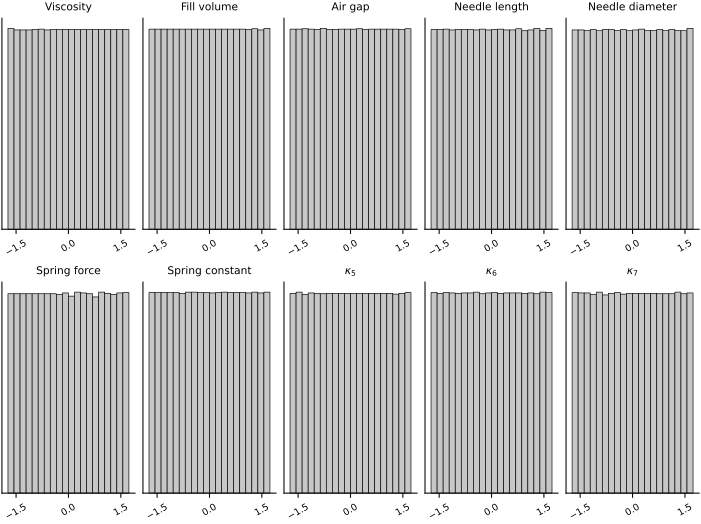
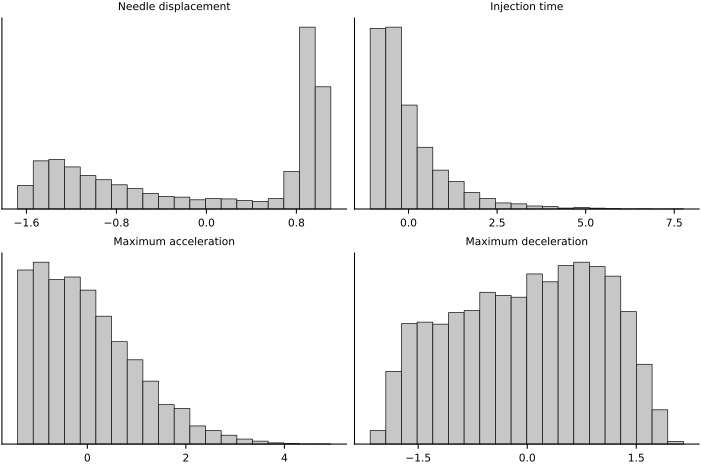
Nice! The input/output data are all more-or-less evenly distributed and standardized. Now on to building the Gaussian process surrogate.
Gaussian process regression#
To demonstrate, we will use tinygp to build a GP surrogate for one of the outputs.
Let’s pick injection time as the output to model.
Our surrogate will be a GP with a zero-mean function and an RBF kernel.
where \(\sigma^2\) is the variance and \(\ell_i\) is the length scale for input dimension \(i\).
Here is how to implement this in tinygp.
First, we’ll create a function that generates a tinygp.GaussianProcess object.
def build_gp(params, X):
    """Build a Gaussian process with RBF kernel.

    Parameters
    ----------
    params : dict
        Hyperparameters of the GP.
    X : ndarray
        Training data input locations.

    Returns
    -------
    GaussianProcess
        The GP.
    """
    amplitude = jnp.exp(params['log_amplitude'])
    lengthscale = jnp.exp(params['log_lengthscale'])
    noise_variance = jnp.exp(params['log_noise_variance'])
    k = amplitude*transforms.Linear(1/lengthscale, kernels.ExpSquared())
    return GaussianProcess(kernel=k, X=X, diag=noise_variance)
Optimizing hyperparameters#
The hyperparameters are the (logs of) the kernel amplitude \(\sigma\), length scales \(\ell = (\ell_1, \dots, \ell_d)\), and the measurement noise level \(\sigma_n\). Let’s set these hyperparameters to some arbitrary values for now. (They will be optimized later.)
init_params = {
    'log_amplitude': 1.0,
    'log_lengthscale': -jnp.ones(10),  # Different lengthscale for each input dimension
    'log_noise_variance': -4.0
}
Now we will optimize the hyperparameters by maximizing the marginal log-likelihood. Here are the loss and train functions:
def loss(params, X, y):
    """Negative marginal log likelihood of the GP."""
    gp = build_gp(params, X)
    return -gp.log_probability(y)

@eqx.filter_jit
def train_step_adam(carry, _, X, y, optim, batch_size):
    params, opt_state, key = carry
    key, subkey = jr.split(key)
    idx = jr.randint(subkey, (batch_size,), 0, X.shape[0])
    value, grads = value_and_grad(loss)(params, X[idx], y[idx])
    updates, opt_state = optim.update(grads, opt_state)
    params = optax.apply_updates(params, updates)
    return (params, opt_state, key), value

def train_gp(init_params, X, y, num_iters, learning_rate, batch_size, key):
    """Optimize the hyperparameters (xi) of a GP using the Adam optimizer.

    Parameters
    ----------
    init_params : dict
        Initial values of the hyperparameters.
    X, y: ndarray
        Training data.
    num_iters : int
        Number of optimization steps.
    learning_rate : float
        Learning rate for the optimizer.

    Returns
    -------
    dict
        The optimized hyperparameters.
    ndarray
        The loss values at each iteration.
    """

    # Initialize the optimizer
    optim = optax.adam(learning_rate)

    # Initialize the optimizer state
    init_carry = (init_params, optim.init(init_params), key)

    # Do optimization
    train_step = partial(train_step_adam, X=X, y=y, optim=optim, batch_size=batch_size)
    carry, losses = lax.scan(train_step, init_carry, None, num_iters)

    return carry[0], losses  # (optimized params, loss values)
We’ll only use 200 data points. (Standard GPs are slow with large datasets, so we’ll use a subset of the data for demonstration purposes.) Here we go:
# Grab a subset of the training data
idx_output = 1  # Corresponds to injection time
idx_subsample = np.random.choice(X_train_scaled.shape[0], size=200)
X_train_scaled_sub = X_train_scaled[idx_subsample]
y_train_scaled_injection_time = y_train_scaled[idx_subsample, idx_output]

# Optimize the hyperparameters of the GP
key, subkey = jr.split(key)
trained_params, losses = train_gp(init_params, X_train_scaled_sub, y_train_scaled_injection_time, num_iters=1000, learning_rate=1e-2, batch_size=100, key=subkey)
fig, ax = plt.subplots(figsize=FIGURE_SIZES["half_standard"])
ax.plot(losses)
ax.set_xlabel("Iteration")
ax.set_ylabel("Negative marginal log likelihood")
finalize_axes(keep_box=False)
array([<Axes: xlabel='Iteration', ylabel='Negative marginal log likelihood'>],
      dtype=object)
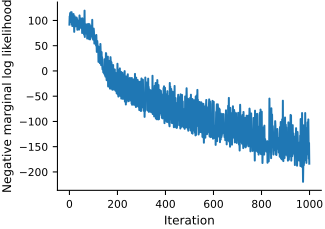
Great! We now have a set of optimized hyperparameters.
Conditioning the GP#
Let’s condition the GP on the training data and compute it’s mean at some arbitrary point. Here is how to do it with tinygp:
# First, build the GP with the trained hyperparameters
gp = build_gp(trained_params, X_train_scaled_sub)

# Next, pick a point at which to evaluate the GP
X_eval = jnp.zeros((1, 10))  # Must be shape (n_pts, n_dim)

# Finally, condition the GP on the training data
_, cond_gp = gp.condition(y_train_scaled_injection_time, X_eval)  # Returns (log marginal probability, conditioned GP)

# The surrogate model is the mean of the conditioned GP
mean = cond_gp.mean

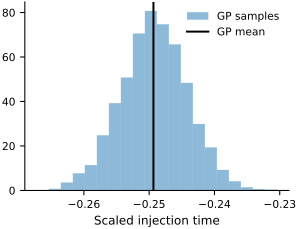
# We can also draw samples of the GP at this point (which will just be samples from a univariate Gaussian)
key, subkey = jr.split(key)
samples = cond_gp.sample(subkey, shape=(5000,))
Note that cond_gp is just another tinygp.GaussianProcess object.
Let’s plot the samples we’ve just collected in a histogram:
Surrogate diagnostics#
We use the test data to assess the surrogate’s accuracy.
Parity plot#
Let’s plot the predicted output against the true output (for the test dataset):
_, cond_gp = gp.condition(y_train_scaled_injection_time, X_train_scaled_sub)
means_train = cond_gp.mean
stdevs_train = jnp.sqrt(cond_gp.variance)

_, cond_gp = gp.condition(y_train_scaled_injection_time, X_test_scaled)
means_test = cond_gp.mean
stdevs_test = jnp.sqrt(cond_gp.variance)
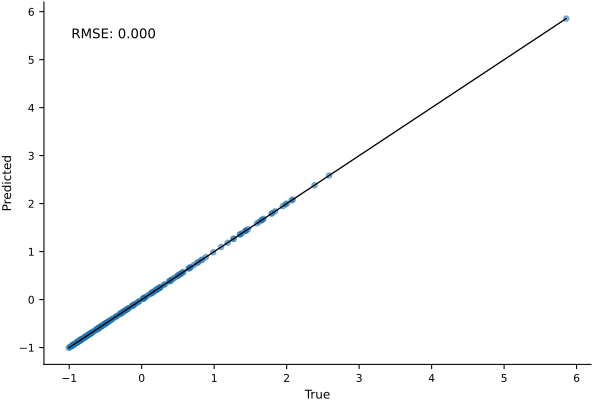
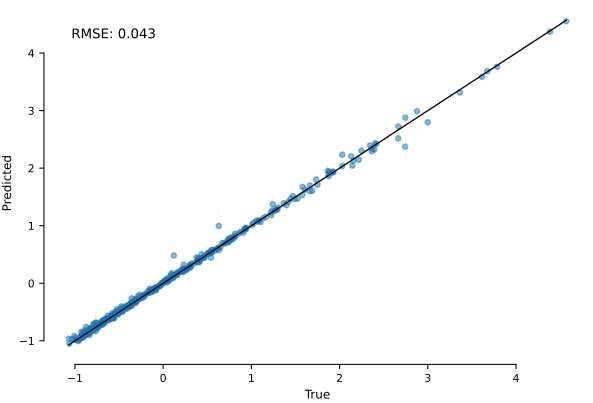
As expected, we’ve fit the training data perfectly (all points lie on the identity line). However, we mostly care about how well we predict unseen (test) data. The fit looks decent.
For GPs, parity plots and RMSE values are good for checking if our predictive mean function is correct. However, they do not say anything about whether our uncertainty estimates are correct. For that, we must look at the standardized errors.
Standardized errors#
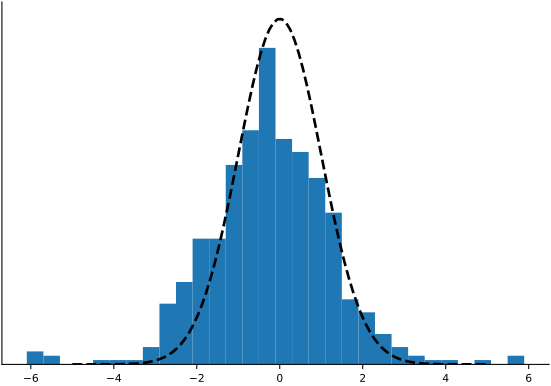
For the \(i^\text{th}\) test data point, the standardized error \(e_i\) is
where \(y_i\) is the true output, and \(m(x_i)\) and \(\sigma(x_i)\) are the mean and standard deviation of the prediction, respectively.
standardized_errors = (y_test_scaled_injection_time - means_test) / stdevs_test
array([<Axes: >], dtype=object)
QQ plot#
The histogram above looks like a normal distribution, but it is sometimes hard to tell. A quantile-quantile (QQ) plot is another way to check normality:
quantiles = jnp.linspace(0.01, 0.99, 40)
normal_quantiles = jstats.norm.ppf(quantiles)
error_quantiles = jnp.quantile(standardized_errors, quantiles, axis=0)
array([<Axes: xlabel='Theoretical quantiles', ylabel='Sample quantiles'>],
      dtype=object)
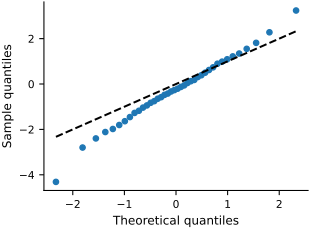
The straighter the line, the more “normal” the errors are. They look decent.
Residuals plot#
Another assumption in our GP model is that the noise is homoscedastic—i.e., the same across all input/output values. We can check this assumption by plotting the error against the model prediction. This is called a residual plot. (Note that residuals is just another name for the errors.)
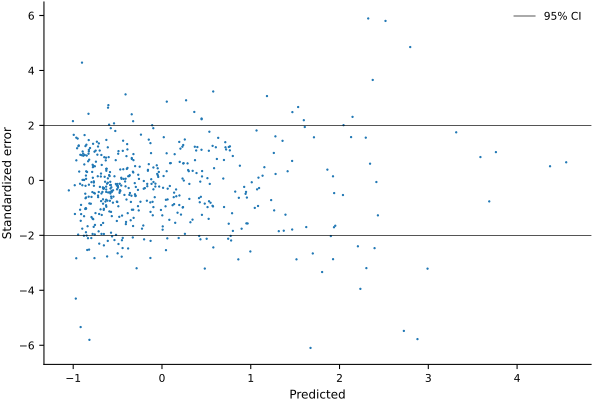
Not too bad.
Multiple outputs#
Let’s now build a surrogate for all four outputs. We will do this by building a GP for each output independently. This is implemented below:
X_train_scaled_sub, y_train_scaled_sub = create_dataset(size=200)
key, subkey = jr.split(key)
trained_params, _ = train_gps(init_params, X_train_scaled_sub, y_train_scaled_sub, num_iters=1000, learning_rate=1e-2, batch_size=100, key=subkey)

# Create a GP for each output variable
gps = [build_gp(trained_params[o_name], X_train_scaled_sub) for o_name in OUTPUT_NAMES]

surrogate = Surrogate(gps=gps, y_obs=y_train_scaled_sub)
Training GP for needle_displacement_m
Training GP for injection_time_s
Training GP for max_acceleration_m_per_s2
Training GP for max_deceleration_m_per_s2
Though not necessary, we have packaged the surrogate into an equinox model Surrogate for convenience. Here is how we can evaluate the surrogate at some \(X\):
# Pick an input point
X = jnp.array([
    10.0,  # viscosity_cP
    1.02,  # fill_volume_mL
    4.5,  # air_gap_height_mm
    12.0,  # needle_length_mm
    0.17,  # needle_diameter_mm
    27.0, # spring_force_N
    200.0,  # spring_constant_N_per_mm
    1.5,  # kappa5
    2.0,  # kappa6
    0.05  # kappa7
])[None, :]  # Shape must be (n_pts, n_dim)

# Scale the input
X_s = scale_x(X)

# Evaluate the surrogate mean
Y_s = surrogate.mean(X_s)  # Must be a scaled X!

# Transform the output back to physical space
Y = unscale_y(Y_s)

print(f'needle_displacement_m:     {Y.squeeze(0)[0]:.5f}')
print(f'injection_time_s:          {Y.squeeze(0)[1]:.2f}')
print(f'max_acceleration_m_per_s2: {Y.squeeze(0)[2]:.0f}')
print(f'max_deceleration_m_per_s2: {Y.squeeze(0)[3]:.1f}')
needle_displacement_m:     0.00898
injection_time_s:          9.76
max_acceleration_m_per_s2: 43154
max_deceleration_m_per_s2: 40377.7
We can also sample the surrogate output:
# Sample the scaled outputs
scaled_samples = surrogate.sample(X_s, 1000, key=key)

# Transform to physical space
samples = vmap(unscale_y)(scaled_samples)
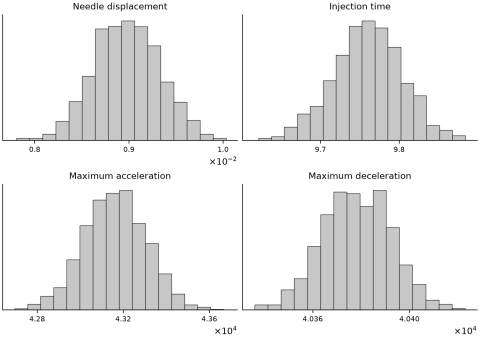
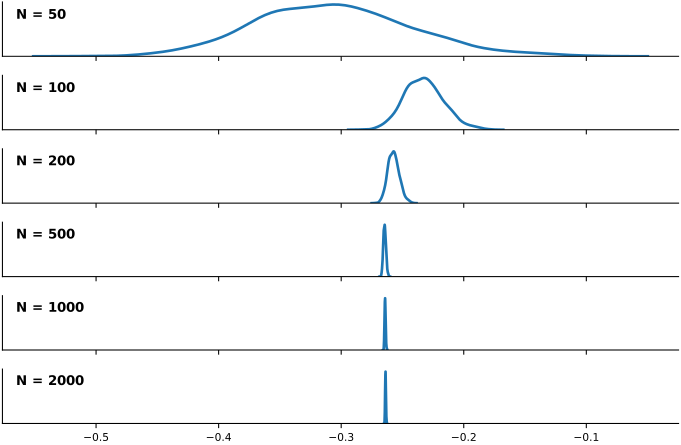
The uncertainty you see here is the epistemic uncertainty (or “lack-of-data” uncertainty). It should go down as we add more data points. We’ll look at this next.
Convergence with training-set size#
Ideally, we want to use enough data so that the epistemic uncertainty is low. Let’s test how much data we need for this problem. We’ll create training datasets of sizes \(N=50, 100, 200, 500, 1000, 2000\) and observe the convergence of the trained GP.
dataset_sizes = [50, 100, 200, 500, 1000, 2000]
datasets_N = {size: create_dataset(size) for size in dataset_sizes}

surrogates_N = {}
trained_params_N = {}
loss_histories_N = {}

for N in dataset_sizes:
    print(f'Training GP with dataset size {N}.')

    key, subkey = jr.split(key)
    X, y = datasets_N[N]
    key, subkey = jr.split(key)
    trained_params_N[N], loss_histories_N[N] = train_gps(init_params, X, y, num_iters=1000, learning_rate=1e-2, batch_size=100, key=subkey)
    gps = [build_gp(trained_params[o_name], X) for o_name in OUTPUT_NAMES]
    surrogates_N[N] = Surrogate(gps=gps, y_obs=y)

    print('done.')
y_latent_samples_N = {}
for i, N in enumerate(dataset_sizes):
    y_latent_samples_N[N] = surrogates_N[N].sample(X_s, num_samples=1000, key=key)  # Shape is (n_samples, n_points, n_outputs)
means_N = {}
stdevs_N = {}
for i, N in enumerate(dataset_sizes):
    s = surrogates_N[N].sample(X_s, num_samples=1000, key=key)
    means_N[N] = jnp.mean(s, axis=0)
    stdevs_N[N] = jnp.std(s, axis=0)
array([<Axes: xlabel='Dataset size', ylabel='Predictive standard deviation'>],
      dtype=object)
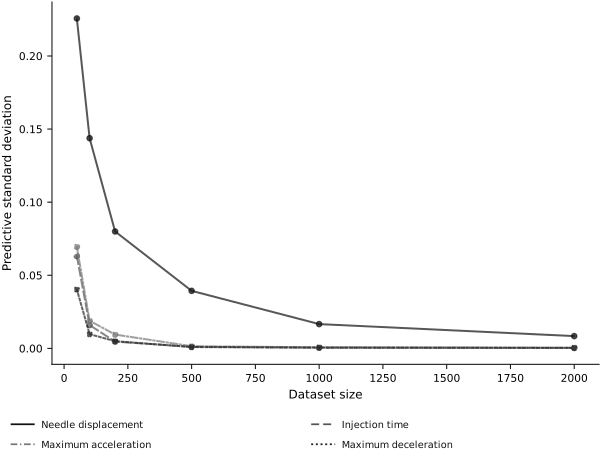
For most of the outputs, we only need a few hundred data points. (Predicting needle displacement accurately, however, will require more data or some inductive biases built into the surrogate.)
Finally, let’s look at the parity plots for the GP trained on the most data.
surrogate = surrogates_N[2000]
samples = surrogate.sample(X_test_scaled, num_samples=1000, key=key)
means_test = samples.mean(axis=0)
stdevs_test = samples.std(axis=0)
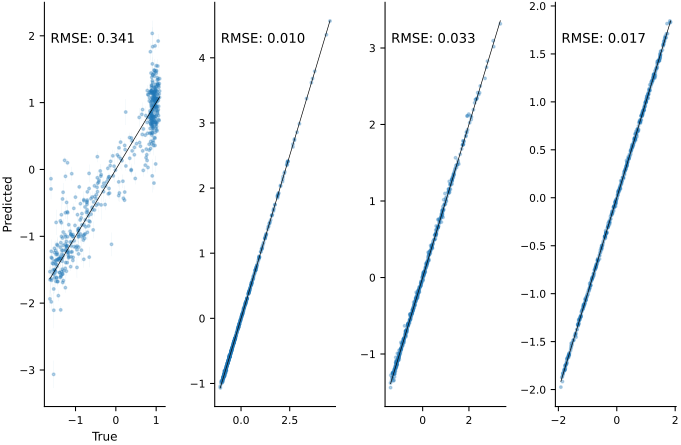
For most outputs, the fit is excellent.
Sensitivity analysis with surrogate#
Now that we have a trained and tested surrogate, we use it for Sobol sensitivity analysis.
Now, let’s create bounds for the inputs (based on physical intuition and/or literature values):
import SALib.sample.sobol as sobol
import SALib.analyze.sobol as analyze_sobol

input_bounds_dict = {
    'viscosity_cP': [1.0, 20.0],
    'fill_volume_mL': [1.0, 1.05],
    'air_gap_height_mm': [4.0, 5.0],
    'needle_length_mm': [8.0, 15.9],
    'needle_diameter_mm': [0.133, 0.21],
    'spring_force_N': [18.0, 36.0],
    'spring_constant_N_per_mm': [150.0, 250.0],
    'kappa5': [0.0, 3.0],
    'kappa6': [0.0, 4.0],
    'kappa7': [0.0, 0.1]
}
input_bounds = np.array([[input_bounds_dict[i][0], input_bounds_dict[i][1]] for i in INPUT_NAMES])
print('The input bounds are:\n', input_bounds)
The input bounds are:
 [[1.00e+00 2.00e+01]
 [1.00e+00 1.05e+00]
 [4.00e+00 5.00e+00]
 [8.00e+00 1.59e+01]
 [1.33e-01 2.10e-01]
 [1.80e+01 3.60e+01]
 [1.50e+02 2.50e+02]
 [0.00e+00 3.00e+00]
 [0.00e+00 4.00e+00]
 [0.00e+00 1.00e-01]]
Next, we create Sobol samples of the inputs and pass them through the surrogate:
problem = {
    'num_vars': len(INPUT_NAMES),
    'names': np.array(INPUT_NAMES),
    'bounds': input_bounds
}

# The number of samples to generate (should be a power of 2).
N = 512

# Generate the samples.
sobol_samples = sobol.sample(problem, N, calc_second_order=False)
sobol_samples_scaled = scale_x(sobol_samples)

# Evaluate the surrogate model at the Sobol samples.
sobol_outputs = surrogate.mean(sobol_samples_scaled)
Finally, we calculate and plot the Sobol indices:
sobol_indices = {}
for i, o_name in enumerate(OUTPUT_NAMES):
    sobol_indices[o_name] = analyze_sobol.analyze(problem, sobol_outputs[:, i], calc_second_order=False, print_to_console=False)
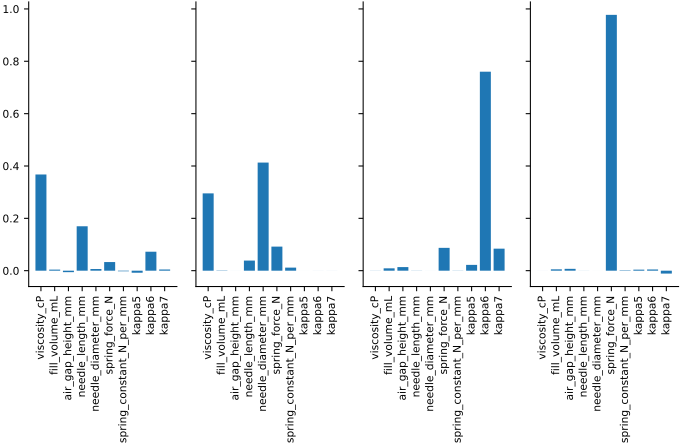
Excellent! We now know to which inputs the outputs are most sensitive. For example, we can see that the injection time is very sensitive to the drug viscosity and needle diameter, somewhat sensitive to needle length and injector spring force, and not sensitive to any other inputs. This information can be used, for example, to further study and understand the physics behind the model, or to investigate how identifiable each parameter is given an experimental dataset.
Remember that sensitivity analysis would not have been feasible without a surrogate model—the true physical model was just too expensive. With a surrogate however, we can do sensitivity analysis, design optimization, uncertainty quantification, etc. all at a reasonable computational cost.