
Show code cell source
MAKE_BOOK_FIGURES=True
import numpy as np
import scipy.stats as st

import matplotlib as mpl
import matplotlib.pyplot as plt
%matplotlib inline
import matplotlib_inline
matplotlib_inline.backend_inline.set_matplotlib_formats('svg')
import seaborn as sns
sns.set_context("paper")
sns.set_style("ticks")

def set_book_style():
    plt.style.use('seaborn-v0_8-white')
    sns.set_style("ticks")
    sns.set_palette("deep")

    mpl.rcParams.update({
        # Font settings
        'font.family': 'serif',  # For academic publishing
        'font.size': 8,  # As requested, 10pt font
        'axes.labelsize': 8,
        'axes.titlesize': 8,
        'xtick.labelsize': 7,  # Slightly smaller for better readability
        'ytick.labelsize': 7,
        'legend.fontsize': 7,

        # Line and marker settings for consistency
        'axes.linewidth': 0.5,
        'grid.linewidth': 0.5,
        'lines.linewidth': 1.0,
        'lines.markersize': 4,

        # Layout to prevent clipped labels
        'figure.constrained_layout.use': True,

        # Default DPI (will override when saving)
        'figure.dpi': 600,
        'savefig.dpi': 600,

        # Despine - remove top and right spines
        'axes.spines.top': False,
        'axes.spines.right': False,

        # Remove legend frame
        'legend.frameon': False,

        # Additional trim settings
        'figure.autolayout': True,  # Alternative to constrained_layout
        'savefig.bbox': 'tight',    # Trim when saving
        'savefig.pad_inches': 0.1   # Small padding to ensure nothing gets cut off
    })

def set_notebook_style():
    plt.style.use('seaborn-v0_8-white')
    sns.set_style("ticks")
    sns.set_palette("deep")

    mpl.rcParams.update({
        # Font settings - using default sizes
        'font.family': 'serif',
        'axes.labelsize': 10,
        'axes.titlesize': 10,
        'xtick.labelsize': 9,
        'ytick.labelsize': 9,
        'legend.fontsize': 9,

        # Line and marker settings
        'axes.linewidth': 0.5,
        'grid.linewidth': 0.5,
        'lines.linewidth': 1.0,
        'lines.markersize': 4,

        # Layout settings
        'figure.constrained_layout.use': True,

        # Remove only top and right spines
        'axes.spines.top': False,
        'axes.spines.right': False,

        # Remove legend frame
        'legend.frameon': False,

        # Additional settings
        'figure.autolayout': True,
        'savefig.bbox': 'tight',
        'savefig.pad_inches': 0.1
    })

def save_for_book(fig, filename, is_vector=True, **kwargs):
    """
    Save a figure with book-optimized settings.

    Parameters:
    -----------
    fig : matplotlib figure
        The figure to save
    filename : str
        Filename without extension
    is_vector : bool
        If True, saves as vector at 1000 dpi. If False, saves as raster at 600 dpi.
    **kwargs : dict
        Additional kwargs to pass to savefig
    """
    # Set appropriate DPI and format based on figure type
    if is_vector:
        dpi = 1000
        ext = '.pdf'
    else:
        dpi = 600
        ext = '.tif'

    # Save the figure with book settings
    fig.savefig(f"{filename}{ext}", dpi=dpi, **kwargs)

def make_full_width_fig():
    return plt.subplots(figsize=(4.7, 2.9), constrained_layout=True)

def make_half_width_fig():
    return plt.subplots(figsize=(2.35, 1.45), constrained_layout=True)

if MAKE_BOOK_FIGURES:
    set_book_style()
else:
    set_notebook_style()

make_full_width_fig = make_full_width_fig if MAKE_BOOK_FIGURES else lambda: plt.subplots()
make_half_width_fig = make_half_width_fig if MAKE_BOOK_FIGURES else lambda: plt.subplots()
The Generalized Linear Model#
Let me now show you the most general form of a linear model. It is called the generalized linear model.
The form of the generalized linear model is:
where the weight vector is:
and
are arbitrary basis functions. Note that the model is linear in \(\mathbf{w}\) not in \(\mathbf{x}\), but the basis functions \(\boldsymbol{\phi}(\mathbf{x})\) can be non-linear.
The polynomial model as a generalized linear model#
We have already seen a generalized linear model example when \(\mathbf{x}\) has only one dimension: the polynomial model. In the polynomial model, the basis functions are:
and so on.
Multivariate linear regression as a generalized linear model#
In multivariate linear regression the inputs \(\mathbf{x}\) have \(d\) dimensions, say
The linear model is:
This is also a generalized linear model with \(m=d+1\) basis functions:
and so on.
Other generalized linear models#
Some common examples of generalized linear models include:
Multi-dimensional polynomials,
where we are using the multi-index notation to save some space.
Radial basis functions,
Fourier series,
We will play with the last two in this section.
Fitting the generalized linear model using least squares#
The idea is to find the best \(\mathbf{w}\) by minimizing a quadratic loss function:
As we discussed in the previous sections, the loss function can be re-expressed as:
Here \(\boldsymbol{\Phi}\in\mathbb{R}^{n\times m}\) is the design matrix:
So, the design matrix is \(N\times M\) where \(N\) is the number of observations, and \(M\) is the number of basis functions. Furthermore, the \(i\)-th column of the design matrix is the \(i\)-th basis function evaluated at all \(N\) observed inputs.
To minimize the loss function, we follow these steps:
Take the derivative of \(\mathcal{L}(\mathbf{w})\) with respect to \(\mathbf{w}\).
Set it equal to zero and solve for \(\mathbf{w}\).
You will get (Bishop, 2006) the following linear system:
This is mathematically identical to what we had for the linear and polynomial regression! The only difference is that we now call the design matrix \(\boldsymbol{\Phi}\) instead of \(\mathbf{X}\).
To solve this problem, use:
You give it \(\mathbf{\Phi}\) and \(\mathbf{y}\), and it returns the \(\mathbf{w}\) that solves the linear system.
Example - Motorcycle data with polynomials#
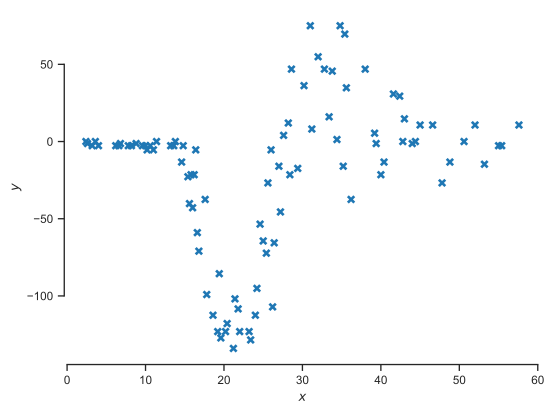
Let’s load the motorcycle data to demonstrate generalized linear models.
The data file is bundled with this book in lecturebook/data/motor.dat.
from pathlib import Path

data_path = Path("../data/motor.dat")
  % Total    % Received % Xferd  Average Speed   Time    Time     Time  Current
                                 Dload  Upload   Total   Spent    Left  Speed
  0     0    0     0    0     0      0      0 --:--:-- --:--:-- --:--:--     0
Let’s load the bundled file and visualize the data:
data = np.loadtxt(data_path)
X = data[:, 0][:, None]
Y = data[:, 1]

fig, ax = plt.subplots()
ax.plot(X, Y, 'x', markeredgewidth=2)
ax.set_xlabel('$x$')
ax.set_ylabel('$y$')
sns.despine(trim=True);
Let’s start with polynomial regression. We need to write code that calculates the design matrix. Here is the code from the previous section:
Show code cell source
def get_polynomial_design_matrix(x, degree):
    """Return the polynomial design matrix of ``degree`` evaluated at ``x``.

    Arguments:
    x      -- A 2D array with only one column.
    degree -- An integer greater than zero.
    """
    assert isinstance(x, np.ndarray), 'x is not a numpy array.'
    assert x.ndim == 2, 'You must make x a 2D array.'
    assert x.shape[1] == 1, 'x must be a column.'
    cols = []
    for i in range(degree+1):
        cols.append(x ** i)
    return np.hstack(cols)
Here is how the design matrix for degree 3 polynomial looks like:
Phi = get_polynomial_design_matrix(X, 3)

print(Phi[:5, :])
[[ 1.     2.4    5.76  13.824]
 [ 1.     2.6    6.76  17.576]
 [ 1.     3.2   10.24  32.768]
 [ 1.     3.6   12.96  46.656]
 [ 1.     4.    16.    64.   ]]
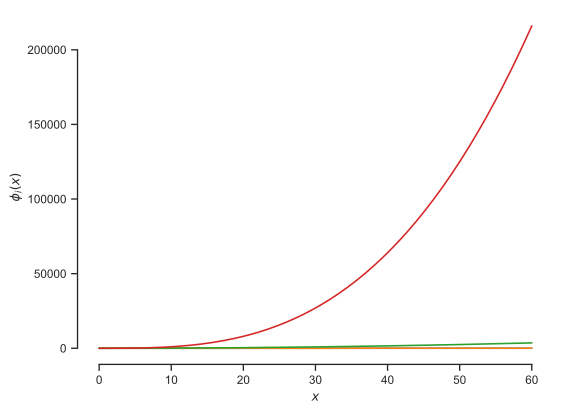
Let’s now visualize the polynomials as a function of \(x\) so that you get some intuition about how \(y\) is expanded:
xx = np.linspace(0, 60, 200)
Phi_xx = get_polynomial_design_matrix(xx[:, None], 3)

fig, ax = plt.subplots()
plt.plot(xx, Phi_xx)
plt.ylabel(r'$\phi_i(x)$')
plt.xlabel('$x$')
sns.despine(trim=True);
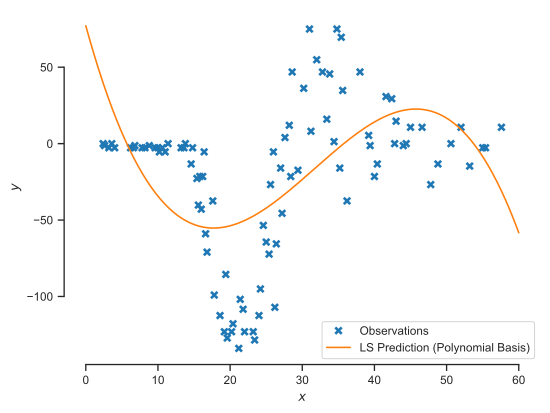
Let’s now solve the least squares problem:
# Fit
degree = 3
Phi = get_polynomial_design_matrix(X, degree)
w_LS = np.linalg.lstsq(Phi, Y, rcond=None)[0]

# Predict
xx = np.linspace(0, 60, 200)
Phi_xx = get_polynomial_design_matrix(xx[:, None], degree)
Y_p = Phi_xx @ w_LS

# Plot
fig, ax = plt.subplots()
ax.plot(X, Y, 'x', markeredgewidth=2, label='Observations')
ax.plot(xx, Y_p, label='LS Prediction (Polynomial Basis)')
ax.set_xlabel('$x$')
ax.set_ylabel('$y$')
plt.legend(loc='best', frameon=True)
sns.despine(trim=True);
Questions#
Experiment with polynomials of degrees 4, 5, 10, 20
When are we underfitting?
When are we overfitting?
Which degree (if any) gives you the best fit?
Example - Motorcycle data with Fourier basis#
Let’s repeat what we did with polynomial regression with a Fourier basis. The mathematical form of the basis is:
and
for \(j=1,\dots,m/2\). First, we write code that computes the design matrix for the new basis:
def get_fourier_design_matrix(x, L, num_terms):
    """Fourier expansion with ``num_terms`` cosines and sines.

    Arguments:
    x          --  A 2D array with only one column.
    L          --  The "length" of the domain.
    num_terms  --  How many Fourier terms do you want.
                   This is not the number of basis
                   functions you get. The number of basis functions
                   is 1 + num_terms / 2. The first one is a constant.
    """
    assert isinstance(x, np.ndarray), 'x is not a numpy array.'
    assert x.ndim == 2, 'You must make x a 2D array.'
    assert x.shape[1] == 1, 'x must be a column.'
    N = x.shape[0]
    cols = [np.ones((N, 1))]
    for i in range(int(num_terms / 2)):
        cols.append(np.cos(2 * (i+1) * np.pi / L * x))
        cols.append(np.sin(2 * (i+1) * np.pi / L * x))
    return np.hstack(cols)
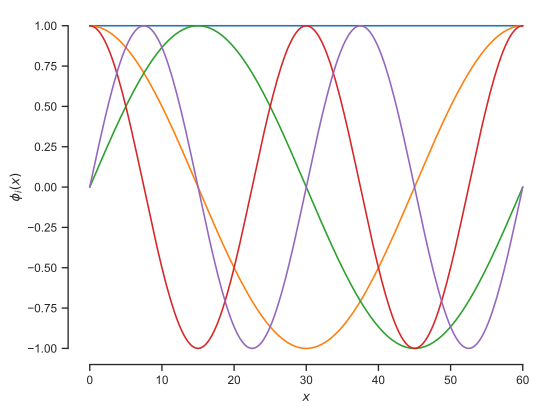
Let’s start by visualizing the Fourier basis:
xx = np.linspace(0, 60, 200)
Phi_xx = get_fourier_design_matrix(xx[:, None], 60.0, 4)

fig, ax = plt.subplots()
plt.plot(xx, Phi_xx)
plt.ylabel(r'$\phi_i(x)$')
plt.xlabel('$x$')
sns.despine(trim=True);
Let’s now solve the least squares problem:
# Fit
L = 60.0
num_terms = 4
Phi = get_fourier_design_matrix(X, L, num_terms)
w_LS = np.linalg.lstsq(Phi, Y, rcond=None)[0]

# Predict
xx = np.linspace(0, 60, 200)
Phi_xx = get_fourier_design_matrix(xx[:, None], L, num_terms)
Y_p = Phi_xx @ w_LS

# Plot
fig, ax = plt.subplots()
ax.plot(X, Y, 'x', markeredgewidth=2, label='Observations')
ax.plot(xx, Y_p, label='LS Prediction (Fourier Basis)')
ax.set_xlabel('$x$')
ax.set_ylabel('$y$')
plt.legend(loc='best', frameon=True)
sns.despine(trim=True);
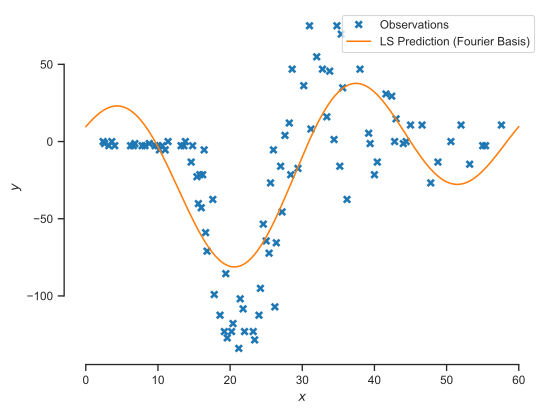
Questions#
Experiment with 4, 10, 20, 40 terms.
When are we underfitting?
When are we overfitting?
Which one (if any) gives you the best fit?
Example - Motorcycle data with radial basis functions#
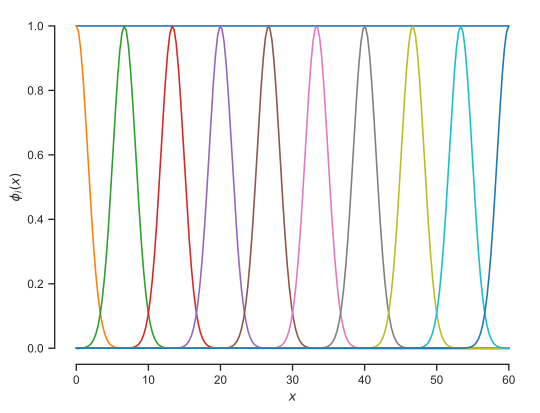
Let’s now try out the radial basis functions. The mathematical form is:
where \(x_i^c\) are points about each the basis functions are centered. We start with the code that evaluates the design matrix:
def get_rbf_design_matrix(x, x_centers, ell):
    """Radial basis functions design matrix.

    Arguments:
    x        --  The input points on which you want to evaluate the
                 design matrix.
    x_center --  The centers of the radial basis functions.
    ell      --  The lengthscale of the radial basis function.
    """
    assert isinstance(x, np.ndarray), 'x is not a numpy array.'
    assert x.ndim == 2, 'You must make x a 2D array.'
    assert x.shape[1] == 1, 'x must be a column.'
    N = x.shape[0]
    cols = [np.ones((N, 1))]
    for i in range(x_centers.shape[0]):
        cols.append(np.exp(-(x - x_centers[i]) ** 2 / ell))
    return np.hstack(cols)
Now let’s visualize the basis:
xx = np.linspace(0, 60, 200)
ell = 5.
num_terms = 10
x_centers = np.linspace(0, 60, num_terms)
Phi_xx = get_rbf_design_matrix(xx[:, None], x_centers, ell)

fig, ax = plt.subplots()
plt.plot(xx, Phi_xx)
plt.ylabel(r'$\phi_i(x)$')
plt.xlabel('$x$')
sns.despine(trim=True);
Now let’s solve the least squares problem with this basis:
# Fit
Phi = get_rbf_design_matrix(X, x_centers, ell)
w_LS = np.linalg.lstsq(Phi, Y, rcond=None)[0]

# Predict
xx = np.linspace(0, 60, 200)
Phi_xx = get_rbf_design_matrix(xx[:, None], x_centers, ell)
Y_p = Phi_xx @ w_LS

# Plot
fig, ax = plt.subplots()
ax.plot(X, Y, 'x', markeredgewidth=2, label='Observations')
ax.plot(xx, Y_p, label='LS Prediction (Radial Basis Functions)')
ax.set_xlabel('$x$')
ax.set_ylabel('$y$')
plt.legend(loc='best', frameon=True)
sns.despine(trim=True);
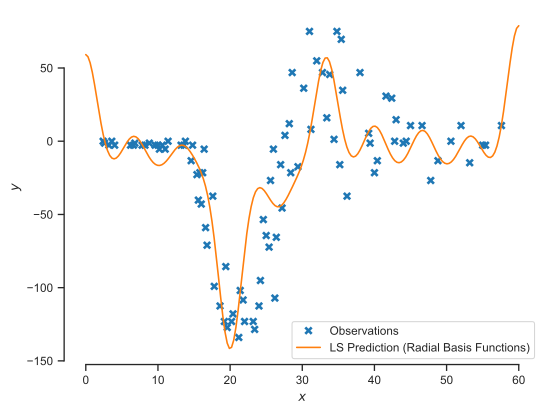
Questions#
Experiment with different values of \(\ell\) and centers.
When are we underfitting?
Which one (if any) gives you the best fit?