
Show code cell source
MAKE_BOOK_FIGURES=True
import numpy as np
import scipy.stats as st

import matplotlib as mpl
import matplotlib.pyplot as plt
%matplotlib inline
import matplotlib_inline
matplotlib_inline.backend_inline.set_matplotlib_formats('svg')
import seaborn as sns
sns.set_context("paper")
sns.set_style("ticks")

def set_book_style():
    plt.style.use('seaborn-v0_8-white')
    sns.set_style("ticks")
    sns.set_palette("deep")

    mpl.rcParams.update({
        # Font settings
        'font.family': 'serif',  # For academic publishing
        'font.size': 8,  # As requested, 10pt font
        'axes.labelsize': 8,
        'axes.titlesize': 8,
        'xtick.labelsize': 7,  # Slightly smaller for better readability
        'ytick.labelsize': 7,
        'legend.fontsize': 7,

        # Line and marker settings for consistency
        'axes.linewidth': 0.5,
        'grid.linewidth': 0.5,
        'lines.linewidth': 1.0,
        'lines.markersize': 4,

        # Layout to prevent clipped labels
        'figure.constrained_layout.use': True,

        # Default DPI (will override when saving)
        'figure.dpi': 600,
        'savefig.dpi': 600,

        # Despine - remove top and right spines
        'axes.spines.top': False,
        'axes.spines.right': False,

        # Remove legend frame
        'legend.frameon': False,

        # Additional trim settings
        'figure.autolayout': True,  # Alternative to constrained_layout
        'savefig.bbox': 'tight',    # Trim when saving
        'savefig.pad_inches': 0.1   # Small padding to ensure nothing gets cut off
    })

def set_notebook_style():
    plt.style.use('seaborn-v0_8-white')
    sns.set_style("ticks")
    sns.set_palette("deep")

    mpl.rcParams.update({
        # Font settings - using default sizes
        'font.family': 'serif',
        'axes.labelsize': 10,
        'axes.titlesize': 10,
        'xtick.labelsize': 9,
        'ytick.labelsize': 9,
        'legend.fontsize': 9,

        # Line and marker settings
        'axes.linewidth': 0.5,
        'grid.linewidth': 0.5,
        'lines.linewidth': 1.0,
        'lines.markersize': 4,

        # Layout settings
        'figure.constrained_layout.use': True,

        # Remove only top and right spines
        'axes.spines.top': False,
        'axes.spines.right': False,

        # Remove legend frame
        'legend.frameon': False,

        # Additional settings
        'figure.autolayout': True,
        'savefig.bbox': 'tight',
        'savefig.pad_inches': 0.1
    })

def save_for_book(fig, filename, is_vector=True, **kwargs):
    """
    Save a figure with book-optimized settings.

    Parameters:
    -----------
    fig : matplotlib figure
        The figure to save
    filename : str
        Filename without extension
    is_vector : bool
        If True, saves as vector at 1000 dpi. If False, saves as raster at 600 dpi.
    **kwargs : dict
        Additional kwargs to pass to savefig
    """
    # Set appropriate DPI and format based on figure type
    if is_vector:
        dpi = 1000
        ext = '.pdf'
    else:
        dpi = 600
        ext = '.tif'

    # Save the figure with book settings
    fig.savefig(f"{filename}{ext}", dpi=dpi, **kwargs)

def make_full_width_fig():
    return plt.subplots(figsize=(4.7, 2.9), constrained_layout=True)

def make_half_width_fig():
    return plt.subplots(figsize=(2.35, 1.45), constrained_layout=True)

if MAKE_BOOK_FIGURES:
    set_book_style()
else:
    set_notebook_style()

make_full_width_fig = make_full_width_fig if MAKE_BOOK_FIGURES else lambda: plt.subplots()
make_half_width_fig = make_half_width_fig if MAKE_BOOK_FIGURES else lambda: plt.subplots()
Information Entropy#
Information entropy is a measure of the uncertainty of a probability distribution. It is defined as:
The sum is over all possible values of the random variable \(X\). If \(X\) is continuous, the sum becomes an integral:
Example - Information Entropy of a Binary Distribution#
Let’s take a random variable \(X\) with two possible values, say \(0\) and \(1\). Two numbers can describe the probability mass function:
and
So, the information entropy of this distribution is simply a function of \(p_0\):
Let’s plot it as we vary \(p_0\):
Show code cell source
eps = 1e-8
p = np.linspace(eps, 1. - eps, 100)
H = -p * np.log(p) - (1. - p) * np.log(1. - p)

fig, ax = plt.subplots()
ax.plot(p, H)
ax.set_xlabel('$p_0$')
ax.set_ylabel('Entropy')
sns.despine(trim=True);
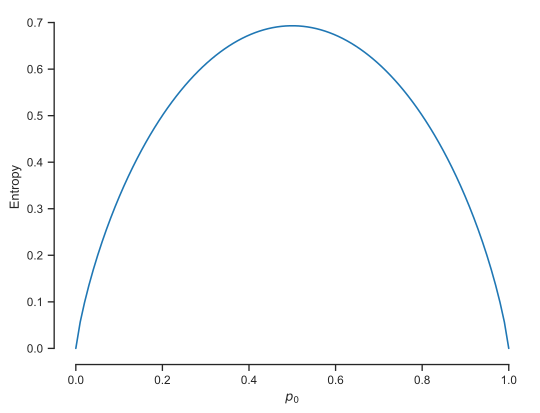
Notice that the function is maximized at \(p_0 = 0.5\) because this corresponds to maximum uncertainty. The function is minimized (as a matter of fact it is exactly zero) at \(p_0 = 0\) and \(p_0 = 1\) because both these cases correspond to minimum uncertainty (you are certain what is going to happen).
Questions#
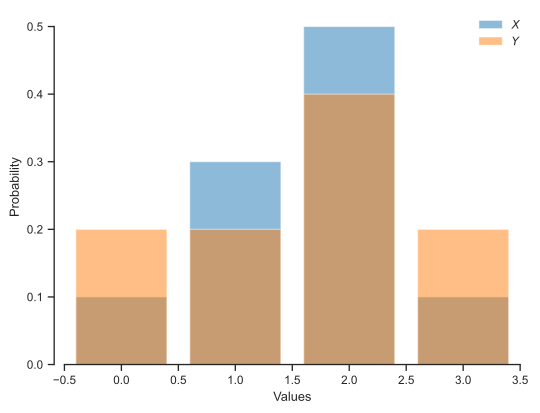
You are given two Categorical distributions:
and
Let’s visualize them:
Show code cell source
import scipy.stats as st

X = st.rv_discrete(
    values=(
        np.arange(4),
        [0.1, 0.3, 0.5, 0.1]
    )
)
Y = st.rv_discrete(
    values=(
        np.arange(4),
        [0.2, 0.2, 0.4, 0.2]
    )
)

fig, ax = plt.subplots()
ax.bar(
    range(4),
    X.pmf(np.arange(4)),
    alpha=0.5,
    label='$X$'
)
ax.bar(
    range(4),
    Y.pmf(np.arange(4)),
    alpha=0.5,
    label='$Y$'
)
plt.legend(loc='best', frameon=False)
ax.set_xlabel('Values')
ax.set_ylabel('Probability')
sns.despine(trim=True);
Questions#
Based on the picture above which of the two random variables, \(X\) or \(Y\), has the most uncertainty?
Use the block code below to calculate the entropy of each one of the distributions and answer the question above (which variable is more uncertaint) in a quantitative way. We can use the functionality of
scipy.statsto compute the entropy.
ent_X = X.entropy()
print(f'H[X] = {ent_X:.2f}')
# Write code that computes and prints the entropy of Y
H[X] = 1.17