
Show code cell source
MAKE_BOOK_FIGURES=True
import numpy as np
import scipy.stats as st

import matplotlib as mpl
import matplotlib.pyplot as plt
%matplotlib inline
import matplotlib_inline
matplotlib_inline.backend_inline.set_matplotlib_formats('svg')
import seaborn as sns
sns.set_context("paper")
sns.set_style("ticks")

def set_book_style():
    plt.style.use('seaborn-v0_8-white')
    sns.set_style("ticks")
    sns.set_palette("deep")

    mpl.rcParams.update({
        # Font settings
        'font.family': 'serif',  # For academic publishing
        'font.size': 8,  # As requested, 10pt font
        'axes.labelsize': 8,
        'axes.titlesize': 8,
        'xtick.labelsize': 7,  # Slightly smaller for better readability
        'ytick.labelsize': 7,
        'legend.fontsize': 7,

        # Line and marker settings for consistency
        'axes.linewidth': 0.5,
        'grid.linewidth': 0.5,
        'lines.linewidth': 1.0,
        'lines.markersize': 4,

        # Layout to prevent clipped labels
        'figure.constrained_layout.use': True,

        # Default DPI (will override when saving)
        'figure.dpi': 600,
        'savefig.dpi': 600,

        # Despine - remove top and right spines
        'axes.spines.top': False,
        'axes.spines.right': False,

        # Remove legend frame
        'legend.frameon': False,

        # Additional trim settings
        'figure.autolayout': True,  # Alternative to constrained_layout
        'savefig.bbox': 'tight',    # Trim when saving
        'savefig.pad_inches': 0.1   # Small padding to ensure nothing gets cut off
    })

def set_notebook_style():
    plt.style.use('seaborn-v0_8-white')
    sns.set_style("ticks")
    sns.set_palette("deep")

    mpl.rcParams.update({
        # Font settings - using default sizes
        'font.family': 'serif',
        'axes.labelsize': 10,
        'axes.titlesize': 10,
        'xtick.labelsize': 9,
        'ytick.labelsize': 9,
        'legend.fontsize': 9,

        # Line and marker settings
        'axes.linewidth': 0.5,
        'grid.linewidth': 0.5,
        'lines.linewidth': 1.0,
        'lines.markersize': 4,

        # Layout settings
        'figure.constrained_layout.use': True,

        # Remove only top and right spines
        'axes.spines.top': False,
        'axes.spines.right': False,

        # Remove legend frame
        'legend.frameon': False,

        # Additional settings
        'figure.autolayout': True,
        'savefig.bbox': 'tight',
        'savefig.pad_inches': 0.1
    })

def save_for_book(fig, filename, is_vector=True, **kwargs):
    """
    Save a figure with book-optimized settings.

    Parameters:
    -----------
    fig : matplotlib figure
        The figure to save
    filename : str
        Filename without extension
    is_vector : bool
        If True, saves as vector at 1000 dpi. If False, saves as raster at 600 dpi.
    **kwargs : dict
        Additional kwargs to pass to savefig
    """
    # Set appropriate DPI and format based on figure type
    if is_vector:
        dpi = 1000
        ext = '.pdf'
    else:
        dpi = 600
        ext = '.tif'

    # Save the figure with book settings
    fig.savefig(f"{filename}{ext}", dpi=dpi, **kwargs)

def make_full_width_fig():
    return plt.subplots(figsize=(4.7, 2.9), constrained_layout=True)

def make_half_width_fig():
    return plt.subplots(figsize=(2.35, 1.45), constrained_layout=True)

if MAKE_BOOK_FIGURES:
    set_book_style()
else:
    set_notebook_style()

make_full_width_fig = make_full_width_fig if MAKE_BOOK_FIGURES else lambda: plt.subplots()
make_half_width_fig = make_half_width_fig if MAKE_BOOK_FIGURES else lambda: plt.subplots()
Credible Intervals#
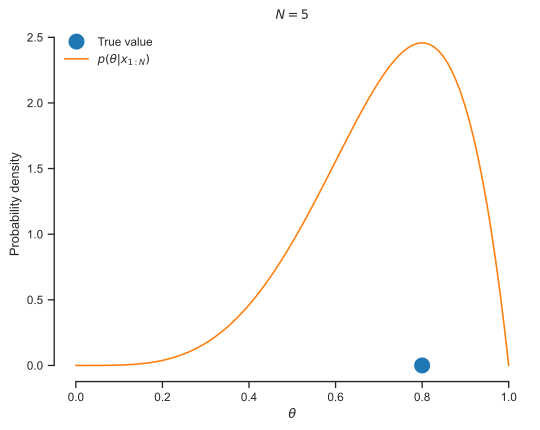
The posterior \(p(\theta|x_{1:N})\) captures everything we say about \(\theta\). Credible intervals are a way to summarize it. A credible interval is an interval inside which the parameter \(\theta\) lies with high probability. Specifically, a 95% credible interval \((\ell, u)\) (for lower and upper bounds) for \(\theta\) is such that:
Of course, there is not a unique, credible interval. You can move \((\ell, u)\) to the left or to the right in a way that keeps the probability contained in it at 0.95.
The central credible interval is particularly common. It is defined by solving the following root-finding problems:
and
for \(\ell\) and \(u\), respectively.
Let’s use a coin toss example to demonstrate this.
Show code cell source
import scipy.stats as st

theta_true = 0.8
X = st.bernoulli(theta_true)

N = 5
data = X.rvs(size=N)

alpha = 1.0 + data.sum()
beta = 1.0 + N - data.sum()
Theta_post = st.beta(alpha, beta)

fig, ax = plt.subplots()
thetas = np.linspace(0, 1, 100)
ax.plot(
    [theta_true],
    [0.0],
    'o',
    markeredgewidth=2,
    markersize=10,
    label='True value')
ax.plot(
    thetas,
    Theta_post.pdf(thetas),
    label=r'$p(\theta|x_{1:N})$'
)
ax.set_xlabel(r'$\theta$')
ax.set_ylabel('Probability density')
ax.set_title('$N={0:d}$'.format(N))
plt.legend(loc='best', frameon=False)
sns.despine(trim=True);
Here is how you can find the credible interval with the help of scipy.stats:
theta_low = Theta_post.ppf(0.025)
theta_up = Theta_post.ppf(0.975)
print(f'Theta is in [{theta_low:.2f}, {theta_up:1.2f}] with 95% probability')
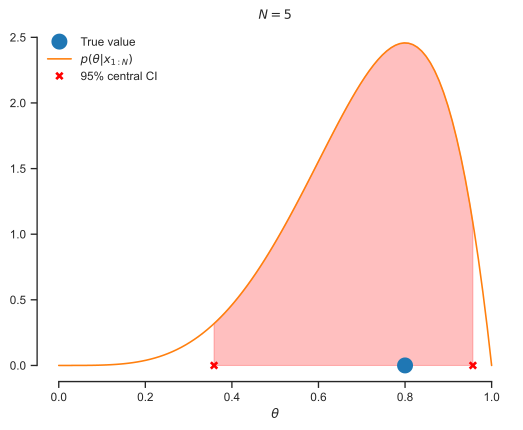
Theta is in [0.36, 0.96] with 95% probability
Let’s visualize the credible interval:
Show code cell source
fig, ax = plt.subplots()
ax.plot(
    [theta_true],
    [0.0],
    'o',
    markeredgewidth=2,
    markersize=10,
    label='True value'
)
ax.plot(
    thetas,
    Theta_post.pdf(thetas),
    label=r'$p(\theta|x_{1:N})$'
)
thetas_int = np.linspace(theta_low, theta_up, 100)
ax.fill_between(
    thetas_int,
    np.zeros(thetas_int.shape),
    Theta_post.pdf(thetas_int),
    color='red',
    alpha=0.25
)
ax.plot(
    [theta_low, theta_up],
    np.zeros((2,)),
    'x',
    color='red',
    markeredgewidth=2,
    label='95% central CI'
)
ax.set_xlabel(r'$\theta$')
ax.set_title(f'$N={N}$')
plt.legend(loc='best', frameon=False)
sns.despine(trim=True);
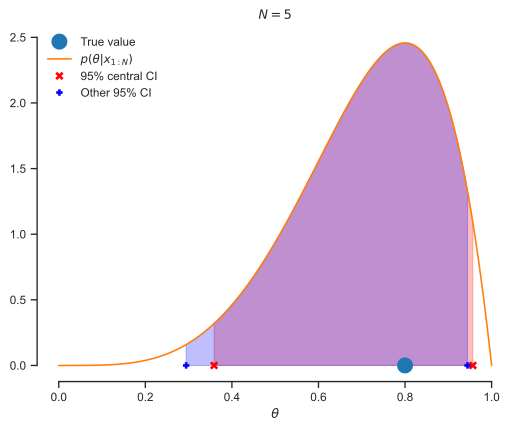
So, is there another 95% credible interval? Yes there is. You can find it by solving thes problem:
and
for \(\ell\) and \(u\), respectively. Here is what you will find for the coin toss example.
theta_low_o = Theta_post.ppf(0.01)
theta_up_o = Theta_post.ppf(0.96)
print(f'Theta is in [{theta_low_o:.2f}, {theta_up_o:1.2f}] with 95% probability')
Theta is in [0.29, 0.94] with 95% probability
And here is how it compares to the previous one:
Show code cell source
fig, ax = plt.subplots()
ax.plot(
    [theta_true],
    [0.0],
    'o',
    markeredgewidth=2,
    markersize=10,
    label='True value'
)
ax.plot(
    thetas,
    Theta_post.pdf(thetas),
    label=r'$p(\theta|x_{1:N})$'
)
thetas_int = np.linspace(theta_low, theta_up, 100)
ax.fill_between(
    thetas_int,
    np.zeros(thetas_int.shape),
    Theta_post.pdf(thetas_int),
    color='red',
    alpha=0.25
)
ax.plot(
    [theta_low, theta_up],
    np.zeros((2,)),
    'x',
    color='red',
    markeredgewidth=2,
    label='95% central CI'
)
thetas_int_o = np.linspace(theta_low_o, theta_up_o, 100)
ax.fill_between(
    thetas_int_o,
    np.zeros(thetas_int_o.shape),
    Theta_post.pdf(thetas_int_o),
    color='blue',
    alpha=0.25
)
ax.plot(
    [theta_low_o, theta_up_o],
    np.zeros((2,)),
    '+',
    color='blue',
    markeredgewidth=2,
    label='Other 95% CI'
)
ax.set_xlabel(r'$\theta$')
ax.set_title(f'$N={N:d}$')
plt.legend(loc='best', frameon=False)
sns.despine(trim=True);
Getting Credible Intervals when the Posterior is not Analytically Available#
Of course, you often do not have the posterior in analytical form and have to estimate the credible intervals via sampling. We will learned about this in Lecture 10.
Questions#
Find the credible interval for \(\theta\) conditioned on the data with 99% accuracy.
How many coin tosses do you have to do to estimate \(\theta\) within an accuracy of \(1\%\) with \(99\%\) probability? Do not try to do this analytically. Just experiment with different values of \(N\) for this synthetic example. Getting a number \(N\) that works for all possible datasets (assuming the model is correct) is an exciting but not trivial problem.